The Investment Dominator comes with integrated buying and selling websites. By default, the URL (web address) of these sites will be something like the following:
www.investmentdominator.com/rei-crm/crm-00000/
Can you imagine slapping that address on your letter to an owner? This would definitely NOT convey a professional-looking link.
Therefore many users, register their own custom domains from a domain registrar like GoDaddy.com and then point that domain to their Investment Dominator account. In other words, when the person types in the custom domain that you purchased (i.e. www.YourDomain.com) it will send them to your buying, or selling site.
Configuring your custom domains involves a 2-step process. Please follow the instructions below to configure both your Buying Website and Selling website(s) in the Investment Dominator.
Note: In the following example we are using domain provider GoDaddy.Com with instructions.
Step 1: Register A Domain And Point It To Our Server
Execute the following to register your purchased Domain on the domain provider’s site, (i.e. GoDaddy, Name Cheap, REI Black Book etc.). In this example access GoDaddy.com.

We recommend that you register one domain for your buying site and another domain for your selling site. The reason we use two separate domains is that the people going to these two sites are in very different markets and have very different mindsets about real estate, so your domains should reflect that mindset that they are in.
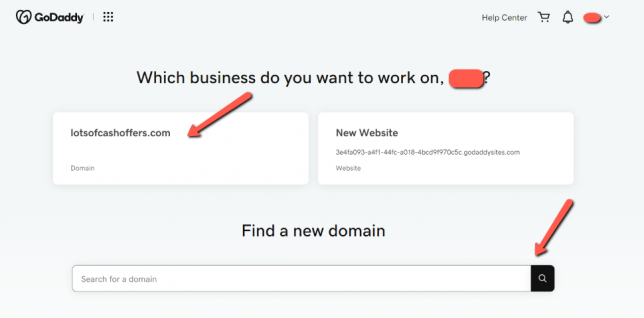
1. Log in to GoDaddy.com
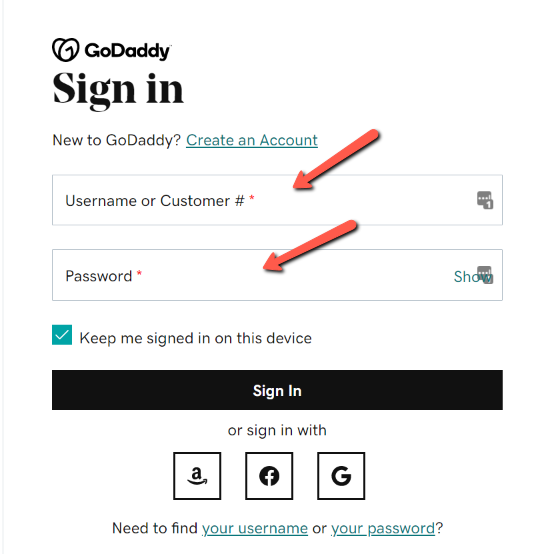
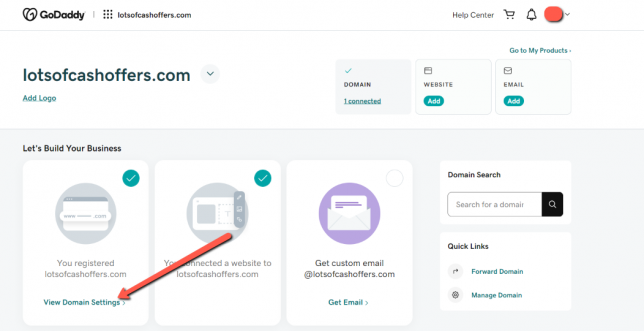
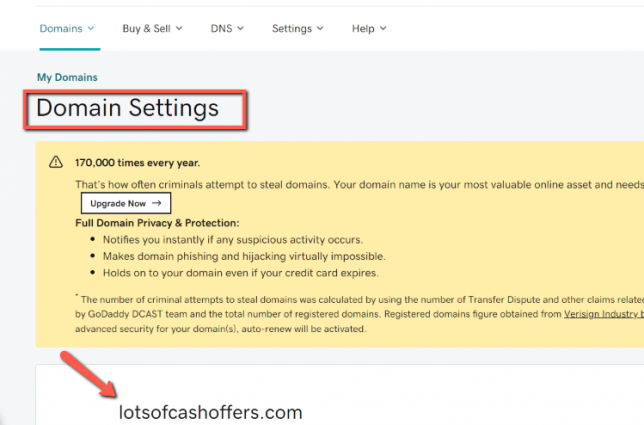
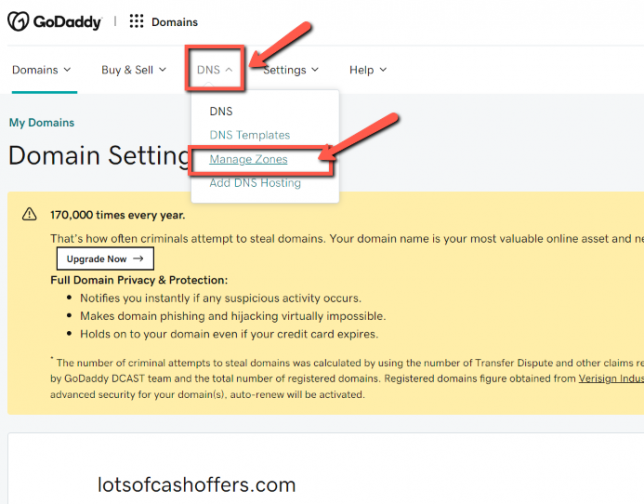
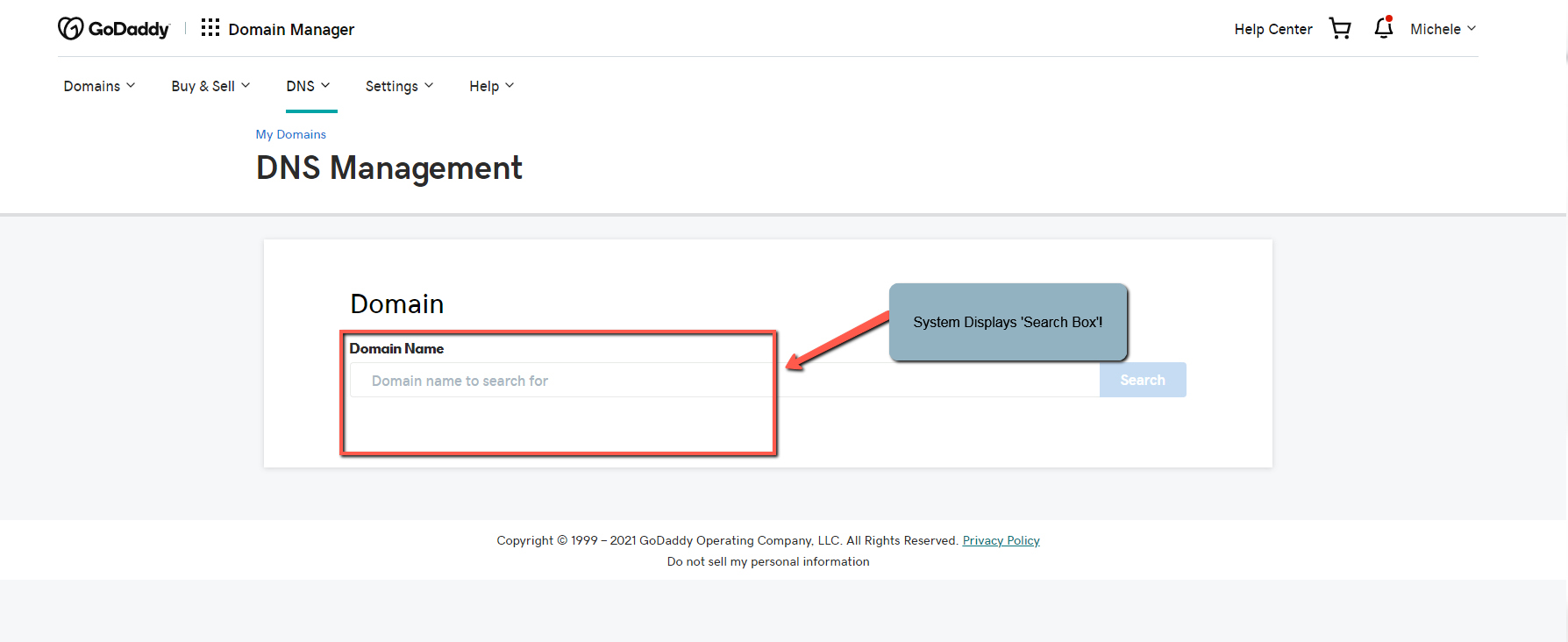
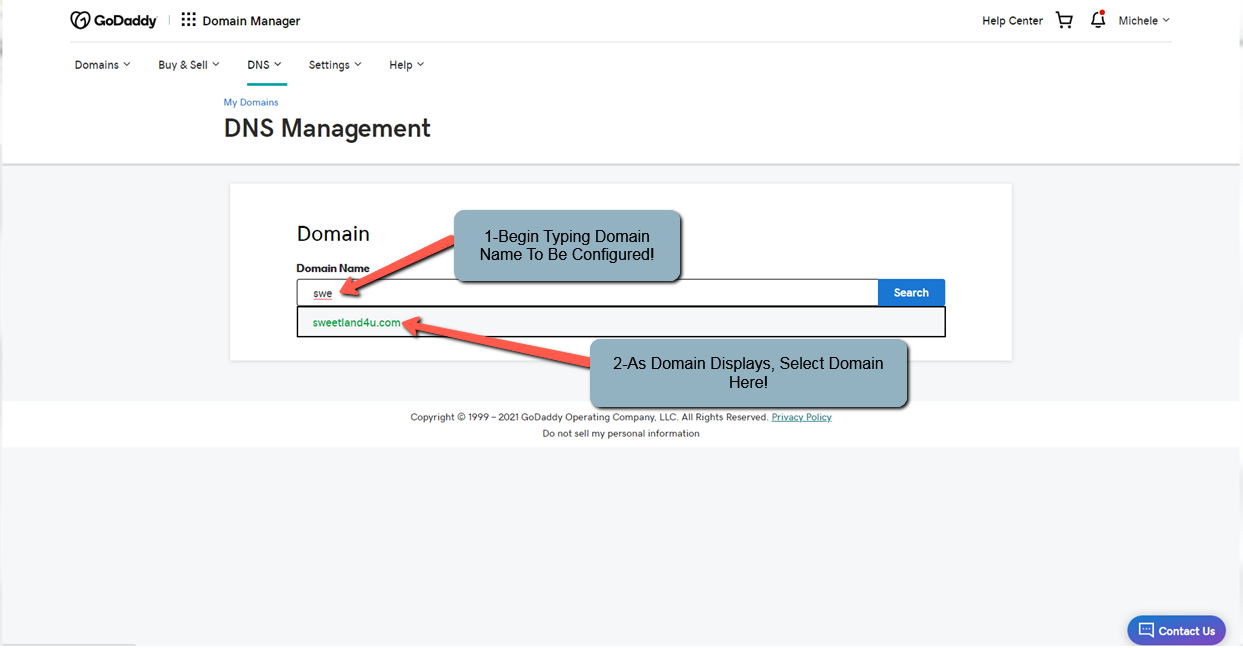
2. Now when you log in you should see your domain name, click under ‘DNS’ to continue:

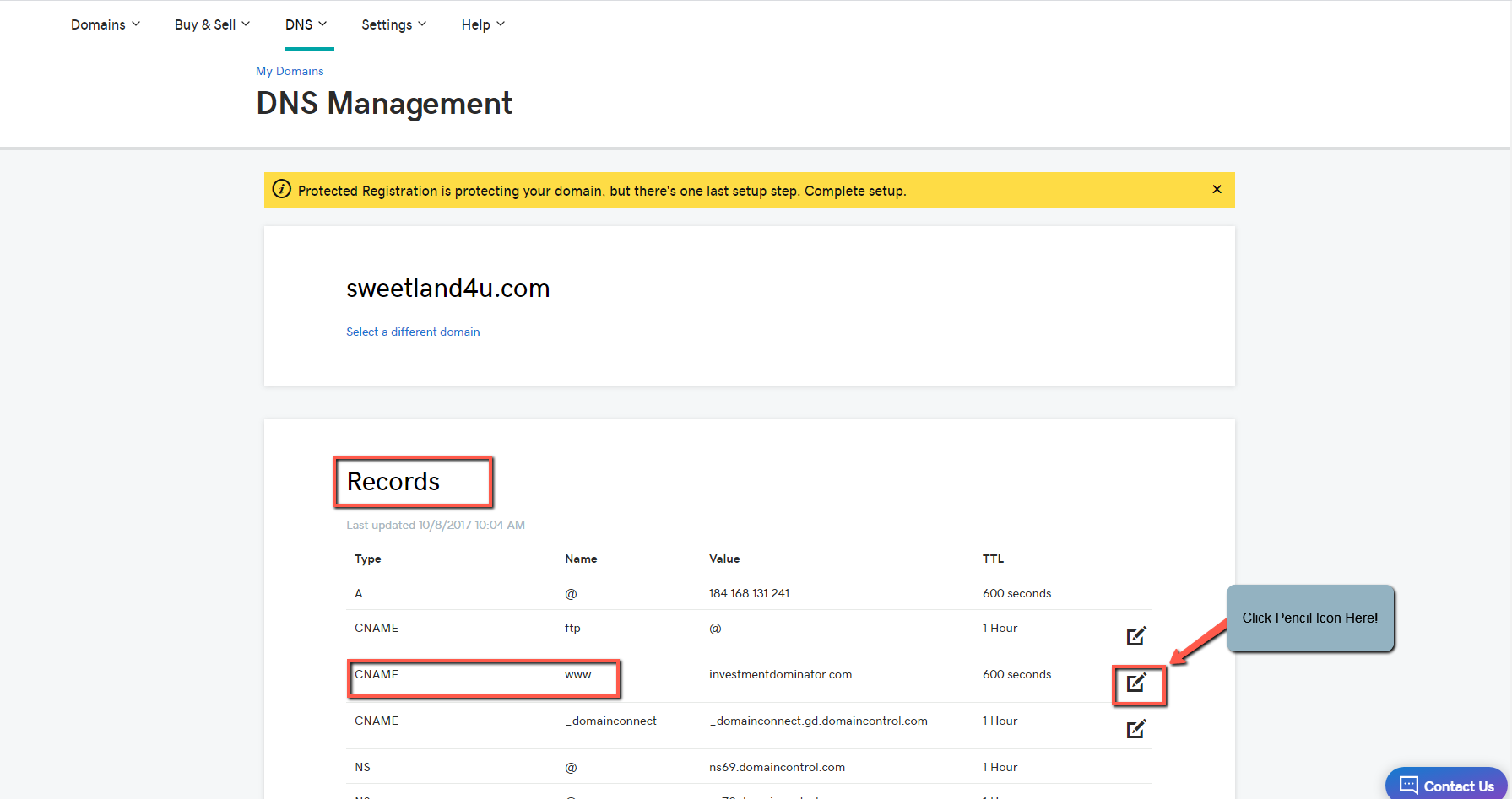
3. Under ‘DNS Management’, let’s scroll down until we find the record where the ‘Type’ is ‘CNAME, ‘Value’ is ‘www’ and ‘Data’ is ‘@’ (or ‘yourdomainname.com’):

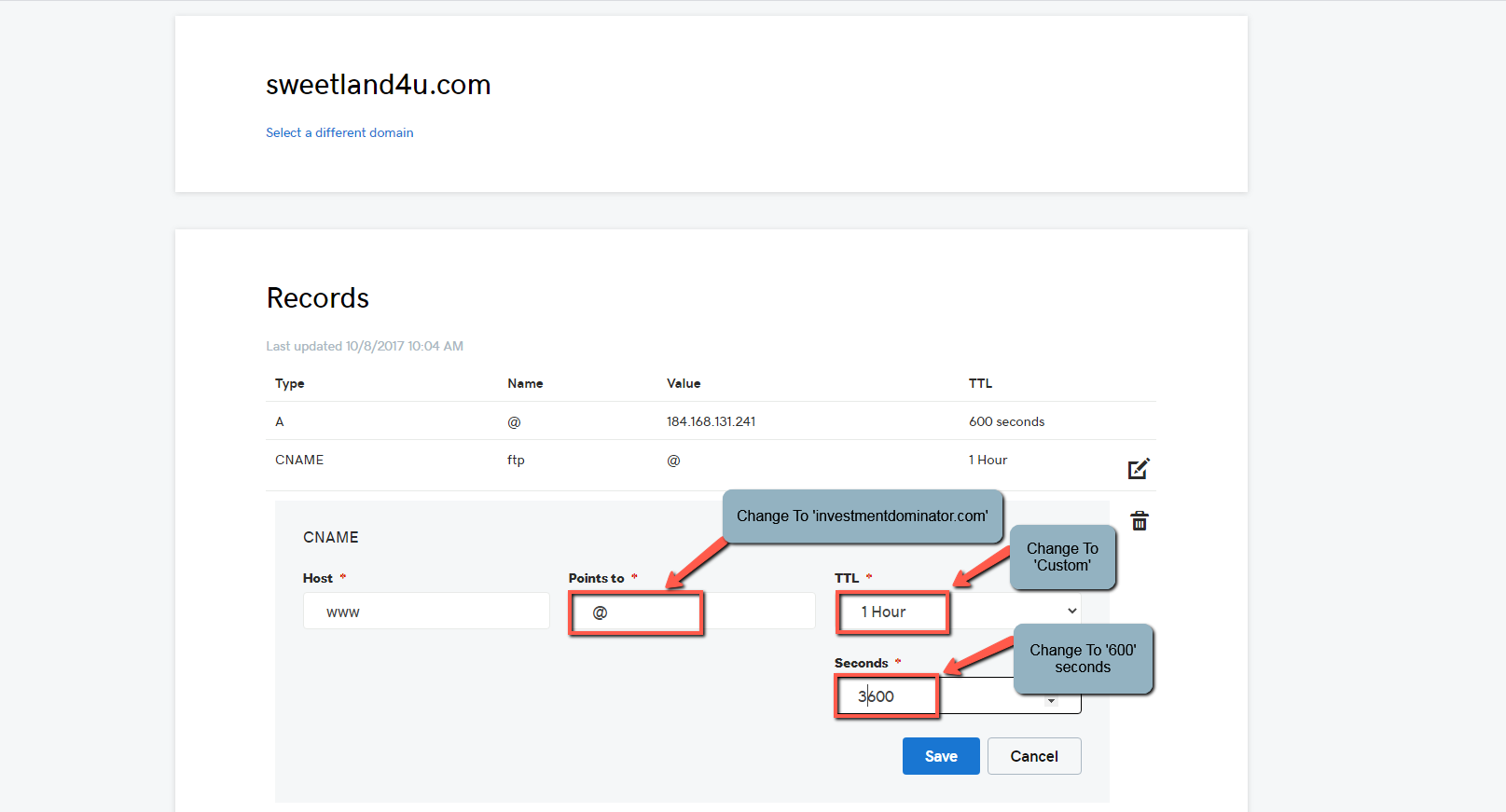
4. We want to click on the Pencil icon at the rightmost of this record to ‘Edit’ it, and we want the ‘Value’ to be ‘investmentdominator.com.’ and the ‘TTL’ to be ‘Custom (600 seconds)’ and press ‘Save’:

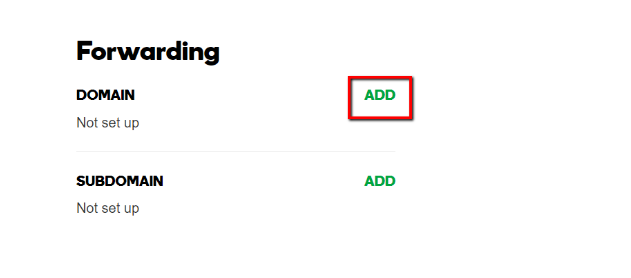
5. Next, we want to scroll all the way back up and click under the ‘Forwarding’ section:

6. Under here, we want to click on ‘Add Fowarding’ in the ‘Domain’ section (Note: not the ‘Subdomain’ section):

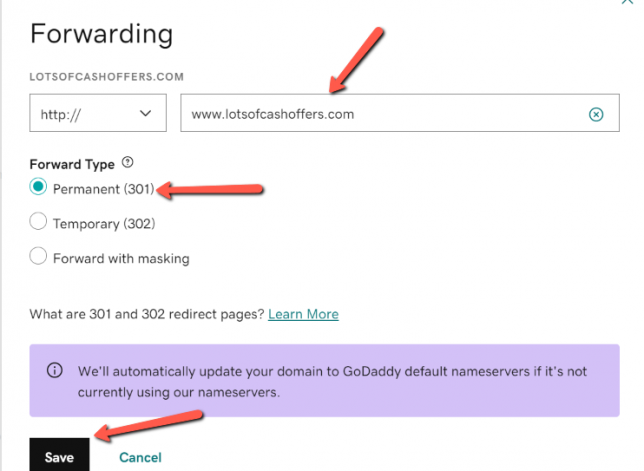
7. Enter in your custom domain starting with the www. in the blank text box to the under the FORWARD TO section.:

8. Select the Permanent (301) option.
9. Check the Update my nameservers and DNS settings to support this change option.
10. Click Save.
Step 2: Map Your Domain To Your APP In Investment Dominator
1. After you have pointed your domain(s) DNS to the correct IP Address, you can map your domains to your Investment Dominator CRM. To do this, log into your Investment Dominator app and go to ‘Settings > Website’ at the top.
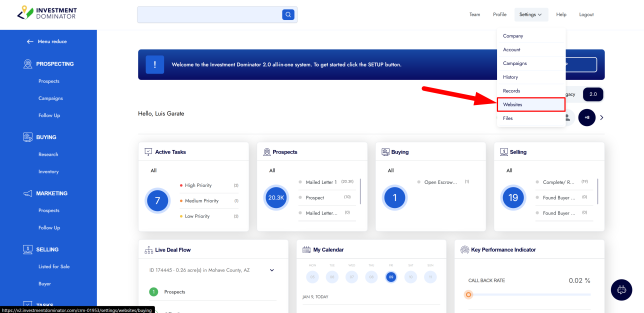
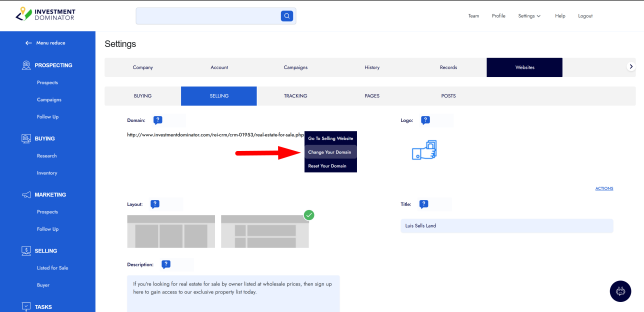
2. Select the ‘Buying’ or ‘Selling’ section, depending on the domain you want to update. Then, in the ‘Domain’ section there, click on ‘Actions > Change your Domain’:
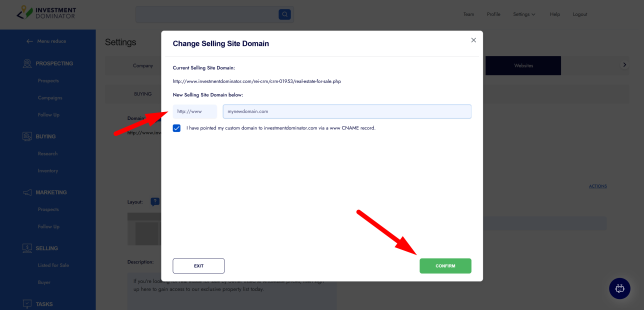
3. Enter your new domain under ‘New Selling Site Domain below’, check the ‘I have pointed my custom domain to investmentdominator.com via a www CNAME record’ option and then click the ‘Confirm‘ button, on the next screen review and confirm the change and your new domain will be saved.

FAQ: Frequently Asked Questions
What is a custom domain?
A custom domain is a web address that you own and use for your Investment Dominator website, such as:
- yourlandcompany.com
- buylandfast.com
Using a custom domain helps build credibility, improves branding, and makes your website easier for sellers and buyers to remember.
Do I need a custom domain to use Investment Dominator?
No. Investment Dominator provides built-in websites that work immediately without a custom domain.
However, most investors choose to use a custom domain because it creates a more professional appearance and strengthens their brand.
How many websites are included with Investment Dominator?
Investment Dominator includes:
- A Buying Website
- A Selling Website
- An Opt-In (Landing) Page
You can configure custom domains for your Buying and Selling websites separately.
Should my Buying and Selling websites use the same domain?
No.
We strongly recommend using separate domains for your Buying and Selling websites.
Keeping the two websites separate helps prevent sellers from seeing properties you are marketing for sale, which can lead to unnecessary pricing discussions and negotiations.
Example:
Buying Website
- ABCLandBuyers.com
Selling Website
- AffordableLandDeals.com
Can I use subdomains instead of separate domains?
No.
Investment Dominator requires separate domains for the Buying and Selling websites. Using subdomains such as:
- buy.mycompany.com
- sell.mycompany.com
is not supported for this setup.
Where can I purchase a custom domain?
You can purchase a domain from most domain registrars, including:
- GoDaddy
- Namecheap
- Google Domains (where available)
- Other domain providers
Choose a provider you are comfortable managing.
Can Investment Dominator register my domain for me?
Yes.
When setting up your websites, you may have the option to register a domain through Investment Dominator.
Benefits:
- Quick setup
- No separate registrar account required
Important:
Domains registered through Investment Dominator are managed by Investment Dominator.
If you later decide to move the domain elsewhere, a transfer process and transfer fee may apply.
Should I purchase my own domain instead?
Many users prefer purchasing domains directly from a registrar.
Benefits include:
- Full ownership
- Easier email setup
- Greater long-term flexibility
- Complete control over domain management
How do I connect a domain I already own?
After purchasing your domain:
- Log into your domain registrar.
- Access your DNS settings.
- Follow the DNS instructions provided by Investment Dominator.
- Update the required DNS records.
- Allow time for DNS propagation.
Once the records have been updated, your domain can be connected to your Investment Dominator website.
How long does domain setup take?
Most domain connections begin working within a few hours.
However, DNS changes can take up to 48 hours to fully propagate worldwide.
During this time, it is normal for the website to appear inconsistently while updates are spreading across the internet.
Why is my website not loading after connecting my domain?
Common causes include:
- DNS records entered incorrectly
- DNS changes still propagating
- Missing or incorrect A Records
- Missing or incorrect CNAME Records
Double-check your DNS settings and allow sufficient time for propagation before troubleshooting further.
Can I change my domain later?
Yes.
However, changing domains after marketing campaigns have been sent can create confusion because previously mailed letters, business cards, and marketing materials may reference the old domain.
For this reason, we recommend spending time selecting a domain you plan to use long-term.
Can I create business email addresses using my domain?
Yes.
If you own your domain through a registrar, you can typically purchase email hosting and create professional email addresses such as:
Many investors use domain-based email addresses to improve professionalism and brand recognition.
Will changing my domain affect my existing website content?
No.
Connecting a custom domain changes the web address visitors use to access your website, but it does not remove your existing website content or settings.
What should I do if my custom domain is not working?
If your domain is not connecting properly:
- Verify all DNS records are entered correctly.
- Confirm DNS propagation has completed.
- Check for typing errors in the domain name.
- Contact your domain registrar if needed.
- Submit a support ticket with screenshots of your DNS settings for assistance.
Providing screenshots often allows the support team to identify configuration issues much more quickly.
What is the best practice when choosing a domain name?
Choose a domain that is:
- Easy to remember
- Easy to spell
- Relevant to your business
- Short and professional
Good Examples:
- FastLandBuyers.com
- TexasLandSolutions.com
- SimpleLandDeals.com
Avoid:
- Long phrases
- Excessive numbers
- Special characters
- Hard-to-spell words
Your domain becomes part of your brand, so choose something you can confidently use for years to come.
Do I need to change my A Record when connecting my domain?
It’s not needed.
To connect your custom domain to your Investment Dominator website, you typically only need to create or update the CNAME record so that it points to:
investmentdominator.com
Important:
You generally do not need to modify your A Record when configuring your domain for use with Investment Dominator.
Recommended Setup:
| DNS Record Type | Host | Points To |
|---|---|---|
| CNAME | www | investmentdominator.com |
After updating the CNAME record, allow time for DNS propagation. Changes may take several hours, and in some cases up to 48 hours, to become active worldwide.
If your domain is not connecting after updating the CNAME record, verify that the CNAME was entered correctly and contact support with a screenshot of your DNS settings for assistance.