Send a tax delinquent letter to reach property owners with unpaid taxes who may be motivated to sell quickly, creating opportunities for faster and more favorable deals.
- Go to ‘Settings > Campaigns> Add Template’.
- Then select the following settings…
- Document Title = (Give your document a name)
- To = Owner – Land Only
- File Type = Both
- Layout = Portrait
- Document Content = (Copy and paste this content under the ‘Source’ button)
- Allow Generate Envelope/Label = Yes and Large Envelope/Labels
- Allow REIPrintMail = Yes
- Ink Color = Black & White
- Allow Bulk Update = Yes
- Move To = Mailed Letter 1
- Per Each Property = No
- Click the blue ‘+ Add Template’ button to save the Custom Template
How To Use Your New Custom Template
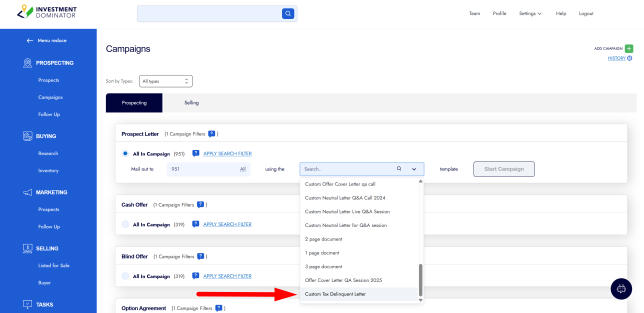
After you have created your custom letter template, you can use it by clicking on ‘Campaigns’ under the ‘Prospecting’ section of the system and in the ‘Prospect section’. You will see an option to use the custom letter template that you created, and it will merge in the information of all contact records in the corresponding status.