The Property IQ Wizard is a game-changing feature that allows you to analyze any property record in Investment Dominator quickly. With just a few clicks, you can map out the property’s location and boundaries, review nearby comparable sales, and even explore area attractions.
Best of all, you can chat directly with the built-in AI Analyst to gain deeper insight into zoning, property use, development potential, and more!
Follow the steps below to access and use Property IQ:
Step 1: Search For A Property In Your System
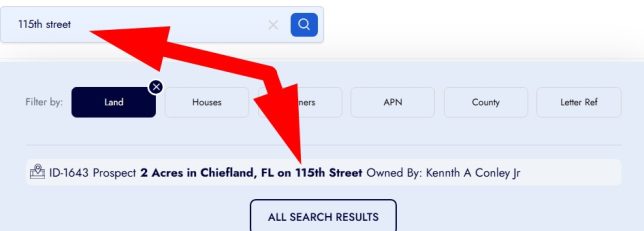
- In the search bar, enter a property name and then select the property record you want to analyze to open it:
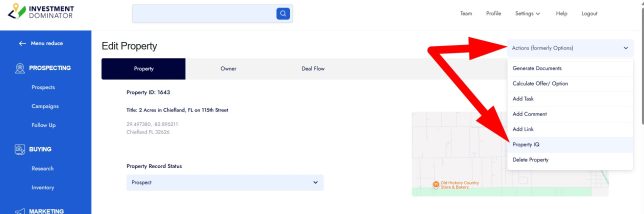
- From the ‘Actions‘ menu to the left of the ‘Edit Property‘ screen and under the ‘Property‘ tab, select the ‘Property IQ‘ option:
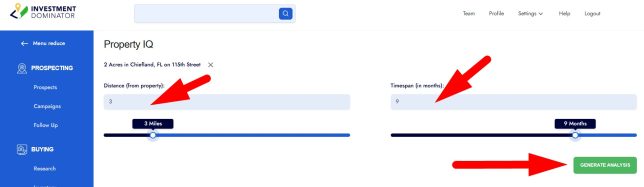
Step 2: Define Your Search Criteria
- Distance: Enter the number of miles around the property that you want to pull data from (1–15 miles max).
- Timespan: Enter the number of months back you want to reference for sales data (1–12 months max).
💡 Pro Tip: For land in rural areas, it is common to select the maximum Distance and Timespan options for a more complete analysis.
- Click the ‘GENERATE ANALYSIS‘ button. The system will now pull property and market data and spin up Property IQ:
Once complete, the initial deal analysis will appear, summarizing key details of the property and deal.
IMPORTANT! Property IQ’s deal and market analysis is generated (in whole or in part) with the assistance of artificial intelligence and with data obtained from third-party sources deemed reliable but not guaranteed. AI-generated content may contain errors, omissions, or outdated information and is provided for convenience only. When the analysis loads, AI models and internal algorithms pre-select a group of property comparables and other inputs to generate an initial valuation. You may then choose which comparables to include or exclude, and the resulting analysis may change meaningfully based on your selections. We encourage you to carefully review these initial choices and adjust them as needed to arrive at a valuation that reflects your judgment and the specifics of the deal. Please independently verify all details before making any investment, financial, or real-estate decisions.
The Deal Analysis
The Deal Analysis includes:
- A brief overview about the property:

- A financial summary of the property value:

- An interactive map that displays:
- The subject property as a blue pin.
- A blue outline of the focus area based on your distance selections
- County/ MLS sales as a yellow pin
- Online sales as a orange pin
- Online listings as a red pin
- and nearby places and amenities as purple pins
NOTE: If the pin appears on the map filled, then it is being included in the analysis and if it appears as just an outline of the pin, then it is being excluded from the analysis.

- Interactive map controls include:
- Hold down your Ctrl (on a PC) or Command (\⌘) (on a Mac) along with your mouse scroll wheel to zoom in or out as needed on the map.
- If you zoom in close to the blue pin you will see the property boundaries of your lot:

- Hover over the ‘Satellite‘ option and select the ‘Labels‘ option to see the street names and nearby places.
- Click the ‘Map‘ option then check ‘Terrain‘ option to see the topography of the area.
- Click a pin on the map to bring up the property card for that property:

- Drag the orange pegman icon to a street next to the property and if it highlights blue, then release the icon over the street to see the street view of the property:

Below the map the ‘Comparable County/MLS Sold‘ area shows the comp data coming from the County/MLS data feed (based on your search criteria):

NOTE: Clicking the Download icon allows you to export the data to a .CSV file and clicking on the up chevron icon allows you to toggle close this section of the analysis.
- Comparable Online Listings (including both sold and listed property):

NOTE: The Difference column outlines the differences between your subject property and the comparable property. Difference indicators include:
- T for Time
- S for Size
- D for Distance
- Z for Zoning

- A list of nearby places and amenities:

- Under the ‘Acquisition Strategy‘ section you can see suggested offer amounts (based on the estimated value that is based on the comparables you choose to include/exclude in our analysis:

- Under the ‘Disposition Strategy‘ section you can see a map of the area and up to 100 cash buyers and owner occupied neighbors.
- Light-green pins indicate neighbors that live nearby to the lot
- Dark-green pins indicate cash buyers that have purchase land in the area
NOTE: Click the pins to open a details card for the potential buyer:

- Click the download icon over the neighbors list to download the data to a .CSV file:


After you have reviewed all the data and made your adjustments as to which comparables you would like to include or exclude in your analysis scroll to the top of the page and click the print icon to generate a printable .PDF document that you can save for your records.

Next to the print icon click the ‘CHAT‘ button to open up the chat pane so you can converse with the AI Analyst regarding the deal…
Chat With The AI Analyst
On the left-side chat pane you can chat with the AI Analyst about:
- The property and owner in more detail
- Comparable sales and how they factor into the property value:

- Zoning, usage, or development potential
- The area and why it may be a great investment opportunity
- You can also request summaries, calculations, reports, letters, or have it do area research:

- Click the Copy Icon whenever you want to copy details directly from the chat pane:

With Property IQ, you have all the information you need to make smarter, faster property investment decisions—right at your fingertips!
NOTE: In order to use Property IQ you will need to first save your property and owner record into the system.
IMPORTANT: The AI Analyst is not a substitute for professional experience, skill, intuition, or knowledge of the local market or area. It is an interactive technology tool designed to help you leverage your time and resources. Always apply your own judgment and expertise when making business and investment decisions.
Frequently Asked Questions
How is the ‘Market Value Range’ calculated?
The Market Value Range in Property IQ is based on comparable property data automatically gathered from multiple trusted real estate data sources. The system looks at both recently sold and currently listed properties in the surrounding area, then applies smart filters to focus only on properties that are similar in size, location, and timing.
It then calculates a weighted average price per acre, giving more influence to properties that are closer, more recent, and similar in lot size. The final value range includes a small margin (±15%) to account for normal market variation.
Why does the ‘Market Value Range’ show a range instead of one exact price?
Real estate markets are dynamic. Property condition, access, zoning, and demand can all affect value. Showing a range provides a realistic estimate that reflects how similar properties are currently selling within the local market.
Why might my property‘s Market Value Range seem higher or lower than expected?
A few factors can cause this, such as:
- Limited comparable sales in rural or low-activity areas
- Recent market changes not yet reflected in available data
- Significant lot size or terrain differences between your property and nearby sales
- Recorded sales with the county that are recording a transaction that is part of a larger bulk deal
Property IQ uses the best available data to create an informed estimate, but always use your own research and expertise when reviewing results.
How do I download neighbor prospects?
You can download neighbor prospects using the Property IQ Wizard.
When reviewing a property in Property IQ, the system allows you to identify and pull neighboring properties around the selected parcel. From there, you can add those neighbors to your prospect list and download them just like any other leads.
What type of data does Property IQ use?
Property IQ pulls real property data and comparable sales from multiple integrated data providers to ensure a broad and balanced analysis of the surrounding market. We pull record sales within county and MLS data as well as both online listed and sold data typically coming from Zillow
Can I rely solely on the AI’s analysis when making investment decisions?
No. Property IQ is a powerful interactive technology tool, but it’s not a substitute for experience, skill, intuition, or local market knowledge. Use the analysis to leverage your time and resources—but always apply your judgment when evaluating a deal and always review and select the comparables that you want to include or exclude from your analysis.