Skip tracing helps you find updated contact information for property owners, which is especially useful for land investors. Owners often do not update their address with the county, causing mail to get returned. Investment Dominator 2.0 includes a built-in Skip Tracing Action to help you reach them by finding current addresses, phone numbers, and emails when available.
STEP 1: Select Records to Skip Trace
- Log in to your Investment Dominator account.
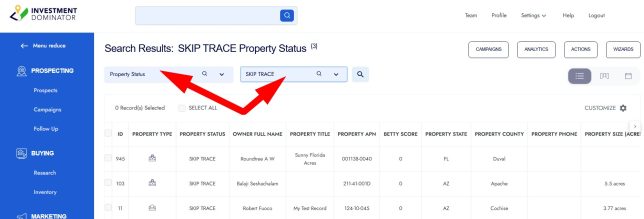
- Navigate to the PROSPECTING section from the left navigation menu. You can use the Quick Search options to quickly locate records in your ‘SKIP TRACE‘ status:
STEP 2: Initiate the Bulk Skip Trace
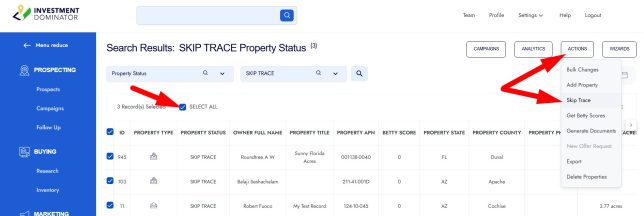
- Select the property records you want to skip trace by checking the boxes next to each record in the table, or by using the ‘Select All‘ options.
- Click the ACTIONS dropdown above the table and select the Skip Trace option:
STEP 3: Review Skip Trace Credit Usage
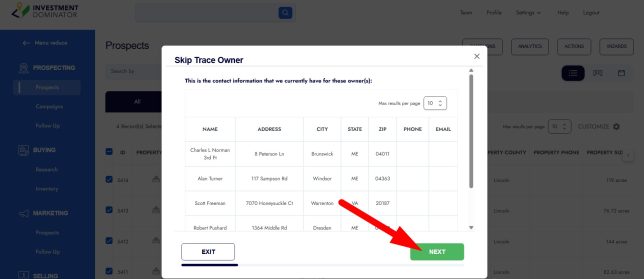
- Review the list of selected records to confirm your choices, then click the NEXT button to proceed:
- The next screen displays a summary showing how many skip trace credits this bulk action will use:
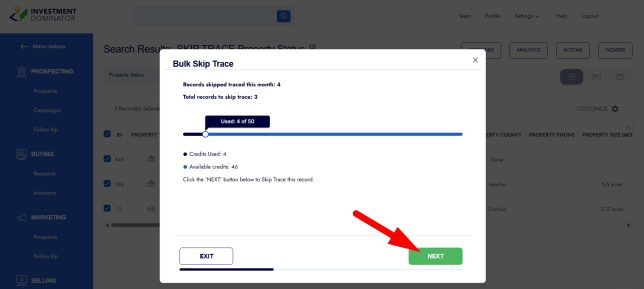
- Compare this with the number of skip trace credits you currently have available in your system.
- If you need more skip trace credits beyond your subscription allotment, you can upgrade your plan to add additional credits.
- Click the NEXT button to initiate the skip trace process.
STEP 4: View Skip Trace Results
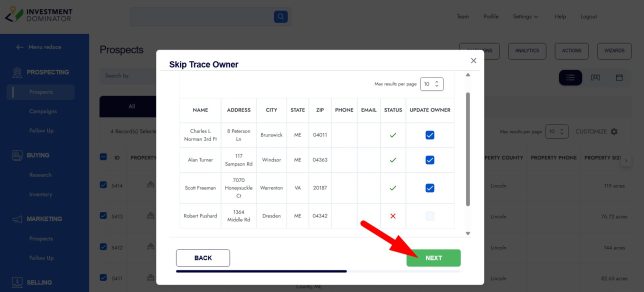
- After processing, you will see a green checkmark, under the ‘STATUS‘ column, next to records for which the system found updated owner contact information.
- A red X will appear next to records where the system could not locate updated information.
- Click the NEXT button to continue.
STEP 5: Update Deal Flow Stages and Tags
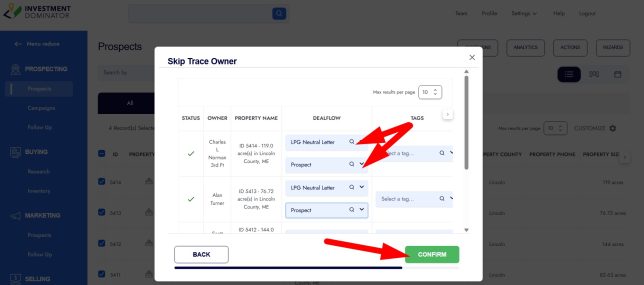
- On the final screen, move skip traced records into appropriate stages of your deal flow to organize your workflow:
- A common practice is to move successfully skip traced records from the ‘SKIP TRACE‘ status back to the ‘Prospect‘ status to prepare for sending the first letter.
- Move records that failed to skip trace into a custom status such as ‘Skip Trace Failed – Additional Research Needed‘ for further follow-up.
- You may also add tags as desired to help categorize or track these records.
Frequently Asked Questions
What contact information is typically returned with skip tracing?
Skip tracing often returns an updated mailing address and may also provide a phone number and/or email address, giving multiple ways to connect with the property owner.
Does skip tracing guarantee updated contact information?
No, skip tracing uses various data sources to locate current owner information, but it does not guarantee results for every record.
Do I lose a skip trace credit if the system cannot find the owner?
Yes, a credit will be deducted even if the service is unable to find the owner.
Can I skip trace multiple owners at once?
Yes, the system supports bulk skip tracing. You simply select multiple records in the PROSPECTING section and use the Skip Trace action to process them together.
What happens if I run out of skip trace credits?
You can upgrade your subscription to purchase additional monthly skip trace credits if your current plan’s allotment is insufficient for your needs.
How should I handle records that fail the skip trace?
It is recommended to move these records to a custom status such as ‘Skip Trace Failed – Additional Research Needed‘ so you can track and perform manual research or alternative contact methods.