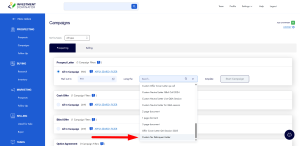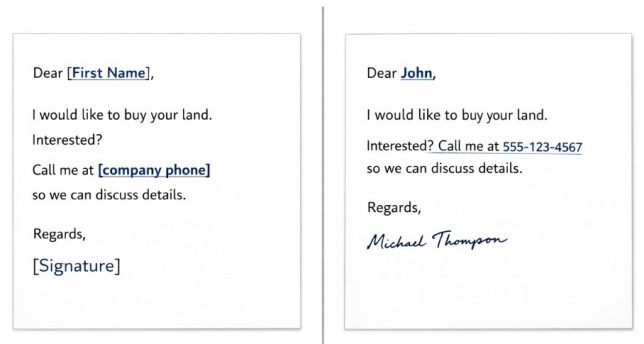
The Investment Dominator equips you with the ability to create your own Custom Document Templates, Custom Website Pages, and Custom Blog, Property Posts and Custom Website Themes. When creating these custom templates you can utilize system merge fields to dynamically pull in data from an Owner Record, Property Record, Contact Record, Your Company Information, or Profile.
Some merge fields do more than just output stored data, they can also…
- Perform basic calculations with any numeric field in the system. To do this you must surround your calculation with double parentheses. For example, the calculation for the Net To Seller amount is (([property-price]-[property-backtaxes]))
- Operators include: + – / *
- Output numeric values as a currency then place USD in front of your calculation for example: USD(([property-price]-[property-backtaxes])) will output the calculated value in the form of USD.
- You can calculate a future date by adding the number of days to any date merge field in the system for example [current-date+7] will output the date of seven days in the future.
- Some merge fields have option variables that you can include inside the merge field to add functionality to them. For example [optin-form confirmation_url=’/custom-page’] allows you to set a custom confirmation page URL for the Optin Form that is created when you use the merge field.
Our Dictionary of Merge Fields
NOTE: Because availability varies by merge field, it is important to use each field only in supported areas.
Theme / Page Merge Fields
Buying Website
Outputs the buying site logo.
[buying-logo]
Outputs the buying site footer menu.
[buying-site-footer-menu]
Returns all buying site menu items as a javascript var on JSON string.
[buying-site-menu-json]
Returns the path to the custom buying site theme.
[buying-theme-path]
Creates a sell form for your house that only has the first step of the process to get a new lead.
[sell-your-house-form-step-one]
Creates a sell form for your house that has the second step (last) of the process to get a new lead.
[sell-your-house-form-step-two]
Creates a sell form for your land that only has the first step of the process to get a new lead.
[sell-your-land-form-step-one]
Creates a sell form for your land that has the second step (last) of the process to get a new lead.
[sell-your-land-form-step-two]
Page / Selling Site
Outputs a Buyers List optin form.
Parameters: button_text, confirmation_url, input_fields
[optin-form]
Selling Website
Displays a property listing element.
Parameters: order=’1
NOTE: The order is the ID of the property listing element you want to display. You can find this under Customize > Website Settings – Selling Site.
[property-listing-elements]
Returns the URL saved under the “Order Link” field of the property record.
[property-listing-order-link]
Outputs property listing order post variables.
[property-listing-order-post-vars]
Returns property listings as JSON.
Parameters: status_id=’11’ page=’1′ limit=’10’
NOTE:
- status_id (e.g. 11 for Selling and 15 for Sold. Leave it empty for both.)
- limit defines the property limit per page.
- page sets the default page to display.
[property_listings_json]
Outputs an available property search bar.
[property-search]
Creates a blank optin page form.
[optin-page-form-custom]
Outputs the selling banner.
[selling-banner]
Outputs the selling banner image.
[selling-banner-image]
Outputs the selling banner text.
[selling-banner-text]
Outputs the selling description.
[selling-description]
Outputs the built-in selling site footer elements.
[selling-site-footer]
Outputs the selling site menu.
[selling-site-menu]
Returns all selling site menu items as a JSON string.
[selling-site-menu-json]
Returns the path to the custom selling site theme.
[selling-theme-path]
Outputs the selling title.
[selling-title]
Outputs an available property map.
[property-listing-map]
Whatever you enter inside the merge tags will appear inside a popup modal.
[popup]PUT YOUR POPUP CONTENT HERE (DO NOT USE MERGE POST DATA)[/popup]
Whatever you enter inside the merge tags will appear as a link that triggers the popup modal.
[popup-link]POPUP LINK[/popup-link]
Theme / Page / Post / Document Merge Fields
Website
Creates a contact us form that the user can customize the classes that it has for their page to look good.
[contact-us-form-custom]
Outputs the title of the custom page.
[page-title]
Website Page
Add this merge field to your Custom Buying or Selling Site Theme .html file to register it as a custom page template so that you can reference it under Customize > Custom Pages and Posts > Add Page.
[custom_page_template name="Custom Page Name"]
Website Post
Returns blog posts as JSON.
Parameters: page_id=’36’ page=’1′ limit=’10’
NOTE:
- page_id is the custom page ID that contains the blog posts you want to display.
- limit defines the article limit per page.
- page sets the default page to display.
[blog_posts_json]
Outputs the post brief.
[brief]
Outputs the post title.
[post-title]
Outputs the read more link.
[read-more-link]
Company Information
Outputs the selling site phone number.
[selling-site-phone]
Outputs the selling site phone extension.
[selling-site-phone-ext]
Outputs your company address.
[my-company-address]
Outputs your company agent first name.
[my-company-agent-firstname]
Outputs your company agent phone number.
[my-company-agent-phone]
Outputs your company city.
[my-company-city]
Outputs your company email.
[my-company-email]
Outputs your company name.
[my-company-name]
Outputs your company phone number.
[my-company-phone]
Outputs your company phone extension.
[my-company-phone-ext]
Outputs the company fax.
[company-fax]
Outputs your company website.
[my-company-site]
Outputs your company state.
[my-company-state]
Outputs your company ZIP code.
[my-company-zip]
Outputs your email.
[my-email]
Outputs your first name.
[my-firstname]
Outputs your last name.
[my-lastname]
Outputs your letter P.S. line.
[my-letter-ps-line]
Outputs your signature set under the My Profile area.
[my-signature]
Outputs the offer email.
[offer-email]
Outputs the offer phone number.
[offer-phone]
Outputs the offer phone extension.
[offer-phone-ext]
Outputs the agency disclosure set under Customize > Company Information.
[my-agency-disclosure]
Outputs the selling logo.
[selling-logo]
General
Outputs the current date.
Parameters: -+ INT
[current-date]
Property Information
Outputs the property featured image.
[property-featured-image]
Outputs a property image.
[property-image]
Outputs the cabin improvement value.
[property-improvement-cabin]
Outputs the fence improvement value.
[property-improvement-fence]
Outputs the mobile home improvement value.
[property-improvement-mobile-home]
Outputs other improvement information.
[property-improvement-other]
Outputs the RV hookup improvement value.
[property-improvement-rv-hookup]
Outputs the septic system improvement value.
[property-improvement-septic-system]
Outputs the shed improvement value.
[property-improvement-shed]
Outputs the well improvement value.
[property-improvement-well]
Outputs the offer acceptance date.
Parameters: -+ INT
[offer-accept-date]
Outputs the offer expiration date.
Parameters: -+ INT
[offer-expire-date]
Outputs the option acceptance date.
Parameters: -+ INT
[option-accept-date]
Outputs the option expiration date.
Parameters: -+ INT
[option-expire-date]
Outputs the property address.
[property-address]
Outputs the after repair value.
Parameters: -+/* INT
[property-after-repair-value]
Outputs the property agent name.
[property-agent-name]
Outputs the property agent phone.
[property-agent-phone]
Outputs the property agent phone extension.
[property-agent-phone-ext]
Outputs the property APN.
[property-apn]
Outputs the assessed value.
Parameters: -+/* INT
[property-assessed-value]
Outputs the back taxes amount.
Parameters: -+/* INT
[property-backtaxes]
Outputs the base tax amount.
Parameters: -+/* INT
[property-base-tax]
Outputs the property city.
[property-city]
Outputs the property county.
[property-county]
Outputs the HOA amount.
Parameters: -+/* INT
[property-hoa]
Outputs the property ID.
[property-id]
Outputs the liens amount.
Parameters: -+/* INT
[property-liens]
Outputs the market value.
Parameters: -+/* INT
[property-market-value]
Outputs the option price.
Parameters: -+/* INT
[property-price-option]
Outputs the repair estimate.
Parameters: -+/* INT
[property-repair-estimate]
Outputs the property restrictions.
[property-restrictions]
Outputs the sale price.
Parameters: -+/* INT
[property-sale-price]
Outputs the seller agent name.
[property-seller-agent-name]
Outputs the seller agent phone.
[property-seller-agent-phone]
Outputs the shapefile.
[property-shapefile]
Outputs the short legal description.
[property-short-legal]
Outputs the property state.
[property-state]
Outputs the property status.
[property-status]
Outputs the property type.
[property-type]
Outputs the property description.
[property-description]
Outputs the property headline.
[property-headline]
Outputs the plat map link.
[property-plat-map-link]
Outputs the average temperature.
[property-average-temperature]
Outputs the property sub-headline.
[property-sub-headline]
Document Merge Fields
Contact Information
Outputs the contact address.
[contact-address]
Outputs the contact address line 2.
[contact-address2]
Outputs the contact cell number.
[contact-cell]
Outputs the contact city.
[contact-city]
Outputs the contact company name.
[contact-company-name]
Outputs the contact email.
[contact-email]
Outputs the contact first name.
[contact-firstname]
Outputs the contact ID.
[contact-id]
Outputs the contact’s interested property address.
[contact-interested-property-address]
Outputs the contact’s interested property APN.
[contact-interested-property-apn]
Outputs the contact’s interested property city.
[contact-interested-property-city]
Outputs the contact’s interested property county.
[contact-interested-property-county]
Outputs the contact’s interested property state.
[contact-interested-property-state]
Outputs the contact’s interested property ZIP code.
[contact-interested-property-zip]
Outputs the contact last name.
[contact-lastname]
Outputs the contact phone number.
[contact-phone]
Outputs the contact state.
[contact-state]
Outputs the contact type.
[contact-type]
Outputs the contact ZIP code.
[contact-zip]
Owner Information
Outputs all owners of record.
[all-owners]
Outputs the caller first name.
[caller-firstname]
Outputs the caller last name.
[caller-lastname]
Outputs either “Dear [caller-fristname]” for an Individual record or “To Whom it May Concern:” for a Company record.
[letter-greeting]
Outputs the owner address.
[owner-address]
Outputs the owner address line 2.
[owner-address2]
Outputs the owner city.
[owner-city]
Outputs the owner company name.
[owner-company-name]
Outputs the owner email.
[owner-email]
Outputs the owner fax.
[owner-fax]
Outputs the owner first name.
[owner-firstname]
Outputs the second owner first name.
[owner-firstname2]
Outputs the owner ID.
[owner-id]
Outputs the owner last name.
[owner-lastname]
Outputs the second owner last name.
[owner-lastname2]
Outputs the owner phone number.
[owner-phone]
Outputs the second owner phone number.
[owner-phone2]
Outputs the owner state.
[owner-state]
Outputs the owner ZIP code.
[owner-zip]
Property Information
This is the maximum offer amount.
[property-max-offer-amount]
Returns your Offer Amount.
Parameters: -+/* INT
NOTE: You can do simple math with numeric fields by surrounding the fields and formula you want to calculate with two parentheses like this: (( )).
[property-price]
Outputs the purchase closing company address.
[property-closing-company-address-purchase]
Outputs the sale closing company address.
[property-closing-company-address-sale]
Outputs the purchase closing company name.
[property-closing-company-name-purchase]
Outputs the sale closing company name.
[property-closing-company-name-sale]
Outputs the purchase closing contact name.
[property-closing-contact-name-purchase]
Outputs the sale closing contact name.
[property-closing-contact-name-sale]
Outputs the purchase closing contact phone.
[property-closing-contact-phone-purchase]
Outputs the sale closing contact phone.
[property-closing-contact-phone-sale]
Outputs the closing type.
[property-closing-type]
Outputs the sale closing type.
[property-closing-type-sale]
Outputs the property directions.
[property-directions]
Outputs the environmental information.
[property-environmental]
Outputs the financing down payment.
[property-financing-downpayment]
Outputs the financing instrument.
[property-financing-instrument]
Outputs whether financing is offered.
[property-financing-offered]
Outputs the financing payment.
[property-financing-payment]
Outputs the financing rate.
[property-financing-rate]
Outputs the financing term.
[property-financing-term]
Outputs flood information.
[property-flood]
Outputs the flood description.
[property-flood-description]
Outputs the impact fee.
[property-impact-fee]
Outputs the maximum option amount.
[property-max-option-amount]
Outputs the property use.
[property-use]
Outputs the property use code.
[property-use-code]
Outputs the property use description.
[property-use-description]
Outputs the property video.
[property-video]
Outputs the waste system requirement.
[property-waste-system-requirement]
Outputs the water system requirement.
[property-water-system-requirement]
Outputs the property ZIP code.
[property-zip]
This returns the “Net To Seller” amount that is used in Jack’s built-in offer template.
USD(([property-price]-[property-backtaxes]))
Theme / Page / Post Merge Fields
Website
Use this on the top of any custom page you want to include in a custom theme.
Parameters: name=’Your Page Name’
NOTE: Make sure you address this page under Website Pages and Posts on Investment Dominator after you upload your custom theme.
[custom_page_template]
Website Post
Returns the default rate and default document fee you setup under Customize > Note Settings.
[financing_settings_json]
Merge Fields with Logic
Some merge fields in the sheet include parameter notes such as -+ INT or -+/* INT these indicate fields that support numeric handling and, in some cases, simple calculations. One example directly from the sheet is to use the merge field string USD(([property-price]-[property-backtaxes])) which will return the Net To Seller amount used in the built-in offer template.