
This guide explains how to access support and training resources within the Investment Dominator 2.0 admin console. If you have questions, concerns, or need to report issues, you can create and manage support tickets directly from the system to get help from the support team.
NOTE: If you are not logged into the admin console you can contact support here.
STEP 1: Access the Help Section
- Log in to your Investment Dominator admin console.
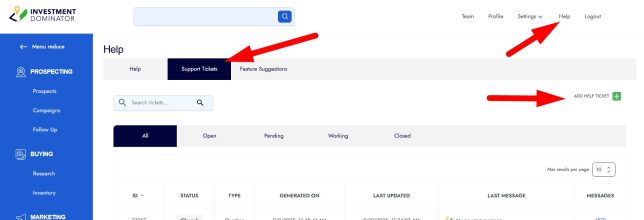
- Click the ‘Help‘ link located at the top right corner of the page.
STEP 2: Create a New Support Ticket
- In the Help area, select the ‘Support Tickets‘ tab.
- Click the ‘ADD HELP TICKET‘ button located at the top right of the Support Tickets page:
- Fill in the ticket details describing your question, concern, or issue.
- You can attach relevant files or include links to provide additional context for the support team.
- Submit the ticket to send your request for support.
STEP 3: View and Reply to Support Tickets
- To see open tickets, go to the ‘Open‘ tab.
- Click on a ticket to view its details and previous messages.
- Enter your reply in the response area and click ‘REPLY‘ to send your message to the support team.
STEP 4: Reply to Closed Tickets
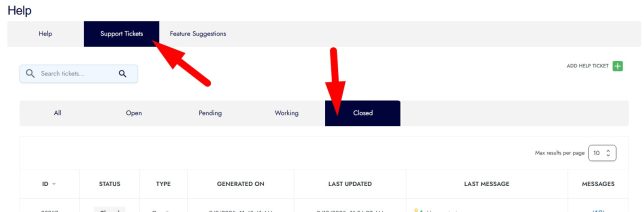
- Navigate to the ‘Closed‘ tab to view tickets marked as resolved or closed:
- You can reply to a closed ticket if you need to provide additional information or reopen the issue.
- Replying to a closed ticket will automatically reopen it for the support team to review and respond.
Frequently Asked Questions
How do I attach files to a support ticket?
When creating or replying to a ticket, use the attachment option to upload files that illustrate your issue or provide supporting documentation.
Can I reopen a closed support ticket?
Yes, replying to a ticket in the ‘Closed’ tab will automatically reopen it so the support team can continue assisting you.
Where can I track all my open and closed support tickets?
All your tickets are organized under the ‘Support Tickets’ tab, separated into ‘Open’ and ‘Closed’ tabs for easy tracking.
Who will respond to my support ticket?
Support tickets are handled by the Investment Dominator customer support team who will review and provide assistance based on your inquiry.
Can I add links to help tickets?
Yes, including links in your ticket can help the support team better understand and troubleshoot your reported issue.