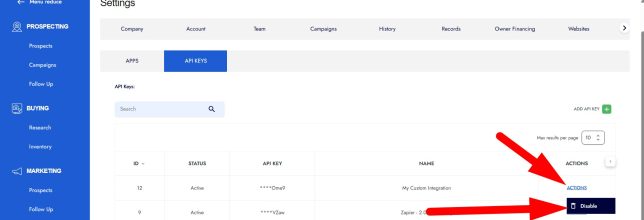
API Keys allow you to securely connect to the API. Think of these like user credentials for your custom API scripts or third-party integrations.
Follow the steps below to generate your API key:
STEP 1: Generate A New Key
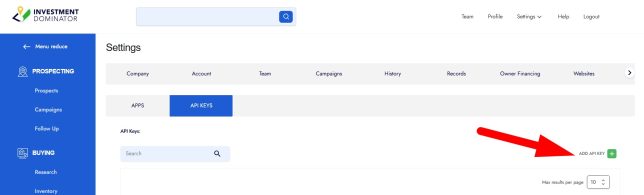
- Navigate to ‘Settings > Integrations > API KEYS‘:

- Click the ‘ADD API KEY‘ button:
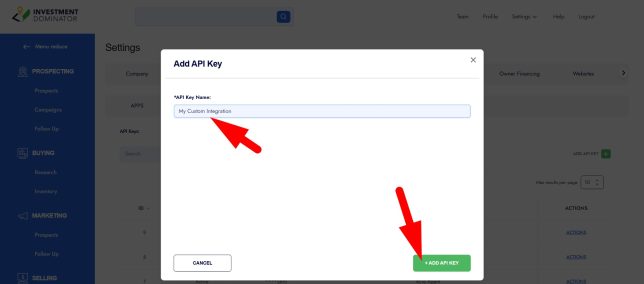
- Enter a name for your API key, then click + ADD API KEY to create it:
STEP 2: Copy Your Key and Keep It Save
- Once your secure key is generated, click the COPY button next to the key to copy it to your clipboard:
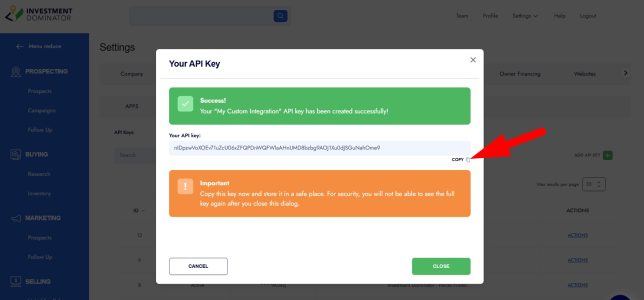
- Be sure to store this key in a safe place, as it will only be shown once.
- Use this key to securely connect to the API without needing a Bearer token.
How To Revoke A Key
If you believe your key has been compromised, you can revoke it at any time:
- Click the ‘ACTIONS‘ menu next to the key that you would like to revoke.
- Select ‘Disable‘: