
The Logo Generator lets you quickly create a simple text and icon-based logo for your Buying or Selling website. You can customize the font, colors, icon, and layout, preview the result, and generate the logo directly from the platform.
1. Open Website Settings
• In Investment Dominator 2.0, go to the top right.
• Hover over Settings.
• Click Websites.
2. Access the Logo Generator
• Under the Buying or Selling website section, locate Logo.
• Click Actions next to Logo.
• Select Logo Generator.

3. Customize Your Logo
In the logo setup window, configure the following:
• Logo Text – Enter the name you want displayed
• Font – Choose a font (example: Open Sans Condensed)
• Font Size – Defaults to 54, editable
• Background Color – Choose a color or enter a hex code
• Text Color – Select the text color
• Icon – Choose from available pre-built icons
• Icon Size – Small to X-Large
• Icon Color – Select your preferred color
• Icon Alignment – Adjust icon placement
• Logo Width – Set width (example: 350px)
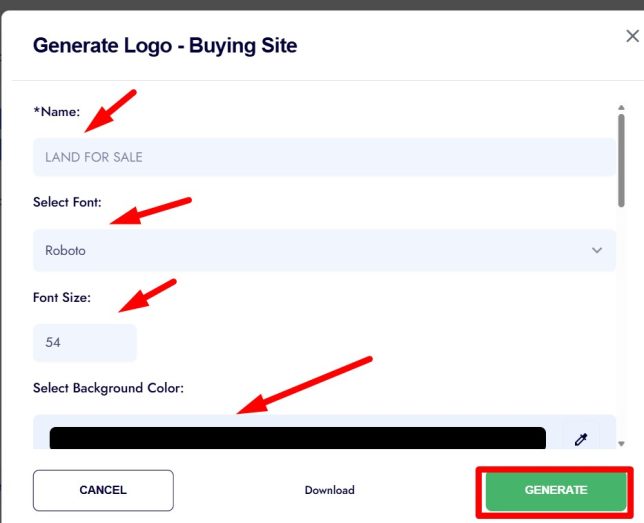
4. Preview and Generate
• Click Preview to see how the logo looks.
• Click Generate to apply the logo to your website.
• Click Download if you want a copy of the logo file.
Frequently Asked Questions
Can I use this logo for both buying and selling sites?
Yes. You can generate separate logos for each site if needed.
Can I upload my own custom logo instead?
Yes. This tool is optional. You can upload a custom image logo if you prefer.
Is this a professional logo design tool?
No. It’s a simple generator for quick branding. For advanced designs, we recommend using a designer.
Can I edit or regenerate the logo later?
Yes. You can return to the Logo settings and update or regenerate it at any time.
Does changing the logo affect my domain or site content?
No. It only updates the logo display on your website.