

Our Buying and Selling websites work out of the box at a default address such as www.investmentdominator.com/rei-crm/crm-00000/. That works, but it looks less professional on letters and marketing. This guide shows you how to point a domain you own at Spaceship (for example, www.yourcompany.com) to your Investment Dominator website.
Setup takes two parts: point the domain in Spaceship, then map it inside Investment Dominator.
STEP 1: Open Your Domain’s DNS Records in Spaceship
We recommend one domain for your Buying site and another for your Selling site. Buyers and sellers are in very different mindsets, so each domain should fit its visitor.
- Log in to your Spaceship account at spaceship.com.
- Open Advanced DNS. You can type Advanced DNS into the Launchpad search field and click the result.
- Click the domain you want to connect to Investment Dominator.
- Find the DNS records panel. Your own records are listed under Custom records.
If you don’t see the DNS records panel, your domain may use another provider’s nameservers. In that case, make the DNS changes at that provider instead.
Menu names may differ slightly if Spaceship updates its dashboard.
STEP 2: Point the www Record to Investment Dominator
You need one CNAME record that sends www to investmentdominator.com. A CNAME record tells the internet that one name is an alias for another.
- Look through Custom records for an existing record with the host www.
- If one exists, delete it first so it doesn’t conflict with the new record.
- If none exists, continue to the next sub-step.
- Click Add record and choose CNAME from the list.
- Fill in the record:
| Field | Value |
|---|---|
| Type | CNAME |
| Host | www |
| Value | investmentdominator.com |
| TTL | Leave the default |
- Click Add.
- Confirm the new www record appears in the list.
[SCREENSHOT: Spaceship Custom records list – the new www CNAME record pointing to investmentdominator.com highlighted]
Enter only www in the Host field, not your full domain. Spaceship adds your domain name for you.
If Spaceship flags a conflict, another record already uses the host www. Delete that record, then add the CNAME again.
STEP 3: Redirect the Root Domain to www
This makes yourcompany.com (without www) send visitors to www.yourcompany.com.
- Go to your Domain List and select your domain.
- Click URL redirect in the side panel.
- Set up the redirect for the root domain (yourcompany.com, not www).
- For the destination, enter https://www.yourcompany.com (use your own domain).
- Save the redirect.
Spaceship’s URL redirect only works when your domain uses Spaceship DNS. If your domain uses another provider’s nameservers, set up the redirect at that provider.
Don’t set the redirect on www. That would override the CNAME record from STEP 2.
STEP 4: Map Your Domain in Investment Dominator
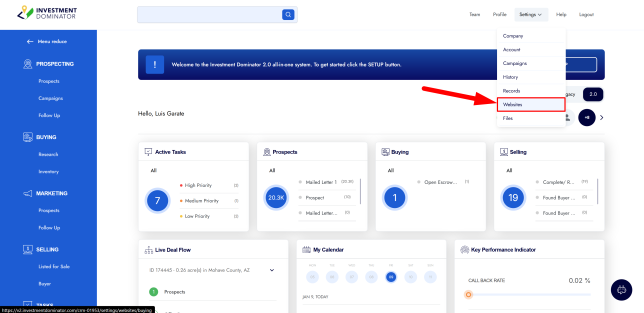
1. After you have pointed your domain(s) DNS to the correct IP Address, you can map your domains to your Investment Dominator CRM. To do this, log into your Investment Dominator app and go to ‘Settings > Website’ at the top.
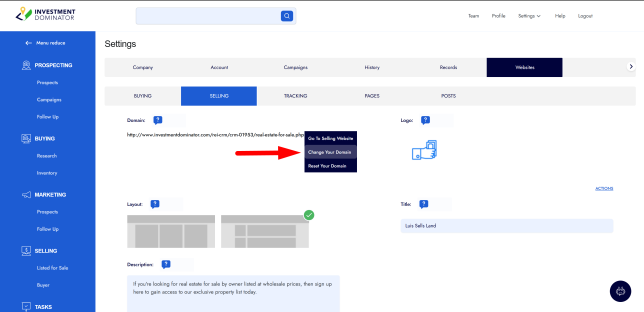
2. Select the ‘Buying’ or ‘Selling’ section, depending on the domain you want to update. Then, in the ‘Domain’ section there, click on ‘Actions > Change your Domain’:
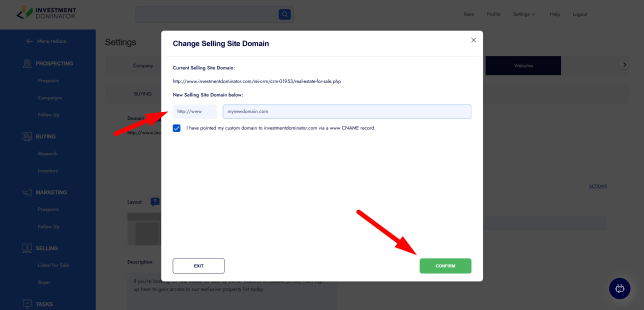
3. Enter your new domain under ‘New Selling Site Domain below’, check the ‘I have pointed my custom domain to investmentdominator.com via a www CNAME record’ option and then click the ‘Confirm‘ button, on the next screen review and confirm the change and your new domain will be saved.

FAQ
Do I have to use a custom domain? No. Your built-in websites work without one, but a custom domain looks more professional on letters and marketing.
Can I use one domain for both sites? Use separate domains for Buying and Selling, so sellers don’t see the properties you have for sale.
Can I use a subdomain like buy.yourcompany.com? No, subdomains aren’t supported for this setup. Use www on its own domain.
How long until it works? Usually a few hours. DNS changes can take up to 48 hours to fully spread.
Do I need to change the A record? Usually not. The www CNAME pointing to investmentdominator.com is what matters.
Should I buy my domain through Investment Dominator or Spaceship? Domains bought through Investment Dominator are managed for you, but moving them out later may cost a fee. Buying at Spaceship gives you more control and makes email setup easier.
Why isn’t my root domain redirecting? Spaceship’s URL redirect only works with Spaceship DNS. Check that your domain uses Spaceship’s nameservers, or set up the redirect at your DNS provider.
My domain still isn’t working. What should I check? Re-check the www CNAME for typos (no http://, no trailing slash) and make sure only one record uses the host www. If it still fails after 48 hours, contact Investment Dominator support with a screenshot of your Spaceship DNS records.


